agentsmcp September 21, 2026 5 min read
Let your coding agent train the robot
kualia is a remote MCP server. Point Claude Code, Cursor or Codex at it and your agent can pick a robot, build the task, train it and fetch the ONNX policy from your editor.
By kualia team
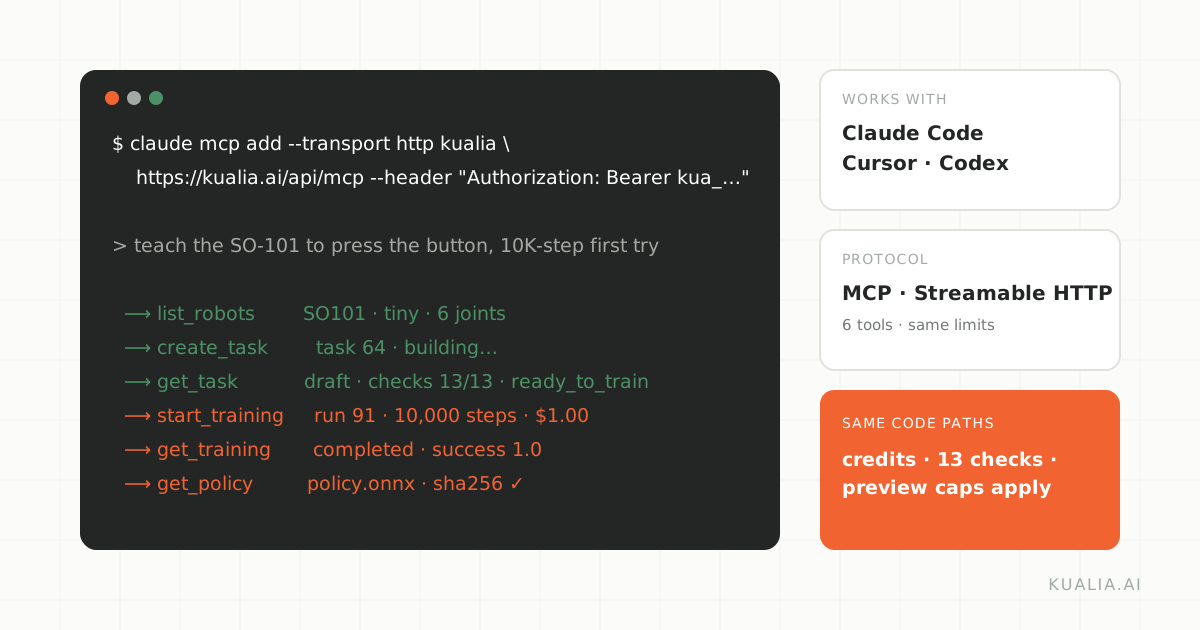
If you already spend your day with a coding agent, the Studio's browser tabs are one context switch too many. So kualia is also a remote MCP server. Claude Code, Cursor, Codex and any other client that speaks the Model Context Protocol over Streamable HTTP can connect to https://kualia.ai/api/mcp and drive the whole workflow with six tools.
Every tool calls the same code paths as the Studio. Credits, plan limits, the 13 checks and the preview-robot caps all apply unchanged; the agent just skips the clicking.
Setup
Create a personal API key under Settings, API keys in the Dashboard. Keys act as you and never reach admin features. Then add the server.
Claude Code:
claude mcp add --transport http kualia https://kualia.ai/api/mcp \
  --header "Authorization: Bearer kua_…"
Cursor, in .cursor/mcp.json (Windsurf and others are similar):
{
  "mcpServers": {
    "kualia": {
      "url": "https://kualia.ai/api/mcp",
      "headers": { "Authorization": "Bearer kua_…" }
    }
  }
}
Codex, in ~/.codex/config.toml:
[mcp_servers.kualia]
url = "https://kualia.ai/api/mcp"
http_headers = { Authorization = "Bearer kua_…" }
Keep the key out of your repository; an environment variable such as $KUALIA_API_KEY in the header works with all three.
The tools
| Tool | What it does |
|---|---|
list_robots |
The built-in robots (tiny, classic, realistic) and your uploaded ones, with joints, difficulty and preview caps. Works without a key. |
create_task |
robot + trick (optional success, difficulty) builds the task in the background and returns a task_id. |
get_task |
Status (building, draft, failed), the plan, world objects, reward, check results as 13/13, failing checks with details, and the Studio link. |
start_training |
task_id + steps (default 10,000, minimum 1,000) starts a PPO run and returns the credits used. |
get_training |
The latest run: status, steps done, progress, mean reward, success rate, error if any. |
get_policy |
Download URLs for the ONNX file and its metadata, plus a ready curl line. |
The server's own instructions to the agent describe the loop: list robots, create a task, poll get_task until the status is draft and all checks pass, start training, poll get_training, then get_policy. Building takes one to three minutes and the agent is told to poll about every 20 seconds. get_task also returns ready_to_train, a single boolean the agent can branch on.
What credits and limits apply
The agent spends the same balance you do. Building a plan is billed by actual model usage, roughly $0.40; training is $0.10 per 1,000 steps, charged when the run starts, so the default 10K-step first try is $1. A run that fails with an error is refunded automatically; a run you stop, or one that finishes without learning the trick, is not.
Plan limits are enforced server-side and surface as tool errors rather than surprises: a start on a task with failing checks returns 409 checks_failing, too little balance returns 402 insufficient_credits, and a budget above your plan's steps per run returns 403 plan_limit_exceeded. The Free plan allows one robot task and 50K steps per run; new accounts start with $5 of welcome credit, which covers a plan and a few first tries. Preview robots (Spot, G1, Panda) are capped at 30,000 steps whichever plan you are on.
If a tool call arrives without a key, the server answers with a short message pointing at the API-keys page instead of an error trace. Tool failures never leak stack traces to the agent.
An example session
This is a paraphrased transcript of the kind of session the tools are designed for. The numbers come from a real production run on the Dynamixel 2R, kualia's simplest robot; the wording is condensed.
The user, in Claude Code: "Use kualia to teach the Dynamixel 2R to reach a target point. Do a 10K-step first try and tell me the success rate."
The agent calls list_robots and finds Dynamixel2R, tier tiny, difficulty easy, 2 joints. It calls create_task with the trick "reach the target point and hold the tip on it" and a success criterion of "tip within 2 cm of the target at the end of the episode". The response carries a task_id and a Studio link.
Over the next two minutes the agent polls get_task. The first replies say building, with the last line of the generation log as progress. Then the status is draft, checks read 13/13, failing_checks is empty, and ready_to_train is true. The plan shows one target object in the world and a reward that closes the distance between the tip and the target.
The agent calls start_training with 10,000 steps and gets back a run id, credits_used of 1.0 and a watch link. It polls get_training: queued, then running with progress climbing, then completed after roughly 80 seconds. success_rate is 1.0 across the deterministic evaluation episodes and mean_reward is positive.
It calls get_policy, receives the ONNX and metadata URLs, and reports back: task built with all 13 checks passing, 10K-step run finished in about 80 seconds, 100 percent success in evaluation, here is the curl line to download the policy, and here is the Studio link if you want to watch it. That is a toy task on a two-joint arm, and a good agent says so; on a biped the same session would end with "the run is a sanity check, here is what the curve shows" rather than a success rate.
Where the human still helps
The Studio link in every response is deliberate. The agent can read the plan and the check results as text, but only the browser shows the composed world in 3D, the drop test and the live policy. A quick look before a long run catches the object placed in the wrong spot that no check flags. Chat changes to the task also go through the Studio and alia; the MCP tools build, train and fetch, they do not edit.
Two habits make agent sessions go well. Give the agent one measurable trick per task, with the success criterion in your words, because a vague brief produces a vague reward whoever writes it. And ask for the 10K-step first try before any bigger budget, so the agent reports a curve and an episode length before it spends real credits.
Try it
Create a key under Settings, add the server with the snippet for your editor, and ask your agent to train the Dynamixel 2R. The tool reference and client configuration live in the documentation, and a machine-readable summary for agents is at /llms.txt.